

『Esphome Water Flow Meter Configuration: Integrating Pulse Counter Sensors Into Home Assistant』Related information(clamp on meter|electromagnetic meter|venturi meterrotameter|orifice meter|ultrasonic flow meter|mass flow meter|coriolis mass flow meter|coriolis flow meter|magnetic flow meter|magmeter flow meter|magflow flow meter|mag meter flow meter|electromagnetic flow meter|vortex flow meter|turbine flow meter|thermal mass flow meter|thermal flow meter|rotameter flow meter)
ESPHome Water Flow Meter Configuration: Integrating Pulse Counter Sensors Into Home Assistant
Quick Answer: You can read a flow meter pulse output in ESPHome with the pulse_counter sensor platform. Wire the pulse signal to a GPIO pin, add a 10k ohm pull-up resistor, and use a lambda filter to convert pulses per minute into flow rate. Silver Instruments supplies industrial flow meters with pulse output from DN15 to DN200 for water, diesel, chemicals, and food fluids.
Why Pulse Output Flow Meters Work With ESPHome
Pulse output is the simplest signal for a microcontroller. Many industrial flow meters generate a pulse each time a known volume passes through the meter. This is not a 4-20 mA loop or HART signal. It is just a dry contact, open collector NPN, or Hall effect square wave. ESPHome reads this as a digital input and counts pulses over a fixed interval.
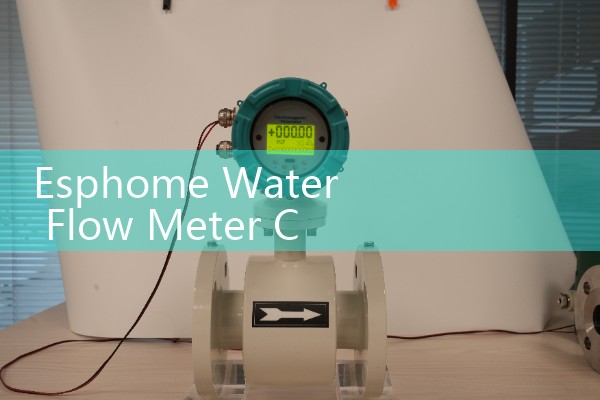
An ESP32 or ESP8266 board costs less than a basic flow totalizer. That is why engineers in Southeast Asia and Latin America use this setup for local monitoring. A water treatment plant in Vietnam asked us about this last year. They wanted to log daily water volume in Home Assistant without adding a PLC. The solution was a Silver Instruments electromagnetic flow meter with pulse output and an ESP32 running ESPHome.
Wiring a Pulse Output Flow Meter to an ESP32
Most industrial flow meters with pulse output need a separate 24 V DC supply. The pulse output is often an open collector NPN. That means the meter pulls the signal line to ground. You need a pull-up resistor between the GPIO pin and 3.3 V. A 10k ohm resistor works for most cases. Connect the signal wire to GPIO5, the meter common to ESP32 ground, and the 24 V DC power to the meter terminals.
Use shielded cable for pulse signals. Keep the cable length under 30 meters. If you run the signal near a pump or VFD drive, add a 0.1 µF capacitor between GPIO and ground. Do not connect a raw 24 V signal to the ESP32. Check the meter manual for the maximum pulse frequency. Silver Instruments pulse output flow meters can be configured for a maximum frequency of 1 kHz or 2 kHz depending on the model.
ESPHome YAML Configuration for a Flow Meter
Use the pulse_counter sensor platform in ESPHome. The sensor reports pulses per minute. You can then scale that value to a flow rate. Here is a basic example for a meter that outputs 100 pulses per liter.
sensor:
  - platform: pulse_counter
    pin: GPIO5
    name: Water Flow Pulse Count
    update_interval: 10s
    filters:
      - lambda: return x * 0.0025;
    unit_of_measurement: L/min
    total:
      name: Total Water Volume
      unit_of_measurement: m3
The lambda factor 0.0025 comes from dividing 0.25 by 100. It converts pulses per minute to liters per minute for a K-factor of 100 pulses per liter. Change the factor to match your meter. If your meter outputs 10 pulses per liter, use 0.1. If it outputs 1 pulse per liter, use 1.0.
For total volume, the total device in ESPHome sums the pulses and applies the filter. You can display total m3 in Home Assistant. This is useful for daily, weekly, or monthly reporting.
Pulse Scaling and K-Factor Calculation
Pulse scaling depends on the K-factor of the flow meter. K-factor is the number of pulses per unit volume. A DN25 electromagnetic flow meter from Silver Instruments may be set to 100 pulses per liter. A DN50 meter may be set to 10 pulses per liter. Read the calibration sheet before you write the ESPHome filter.
Here is the thing. If the ESPHome pulse counter reads 1500 pulses per minute, and the K-factor is 100 pulses per liter, the flow rate is 15 L/min. That equals 900 L/h. Divide the raw pulse rate by the K-factor to get volume per minute. Multiply by 60 to get volume per hour. Most engineers skip this part and guess the factor. Then the
For viscous fluids above 1000 cP, an oval gear flow meter with pulse output gives better repeatability than an electromagnetic meter. For fuels like diesel or heavy oil, check that the meter has ATEX Zone 1 certification if the area is hazardous. Silver Instruments supplies oval gear flow meters with pulse output for fuel and chemical batching.
Field Notes From Water and Fuel Sites
Noise is the main problem with pulse counting. We have seen this on customer sites many times. A pump motor or Variable Frequency Drive can cause false counts. Shielded cable and a 0.1 µF capacitor solve most cases. A customer in Indonesia used a pulse output vortex flow meter for steam condensate. The pulse signal was unstable because the cable ran alongside a VFD cable. Moving the signal cable to a separate tray fixed it.
For outdoor installations, use an ESP32 in a sealed enclosure. Keep the board away from direct sunlight and rain. Power the ESP32 from a stable 5 V DC supply. Do not use a phone charger that creates electrical noise. A small DIN rail power supply works better. In marine applications, add a galvanic isolator or use a separate ground reference. Salt air corrodes exposed GPIO pins. Use conformal coating on the board.
Flow Meter Selection for Home Assistant
The best meter depends on the fluid and the pipe size. For clean water and wastewater, an electromagnetic flow meter with pulse output is a solid choice. Silver Instruments offers these in sizes from DN15 to DN200. For diesel, oil, or food fluids, choose an oval gear flow meter with pulse output. For steam or gas, a vortex flow meter with pulse output works well. For low flow gas measurement, a thermal mass flow meter can also provide a pulse output.
Pressure transmitters and paperless recorders can sit on the same Home Assistant dashboard. Use Modbus or 4-20 mA inputs if you need more process data. But for basic flow total and flow rate, pulse output plus ESPHome is the fastest path. The total cost is often under 200 USD without the flow meter.
FAQ
Can ESPHome read a pulse output from an industrial flow meter?
Yes. ESPHome has a pulse_counter sensor platform that counts digital pulses on a GPIO pin. It works with open collector, reed switch, and Hall effect pulse outputs.
How do I convert pulse count to flow rate?
Take the K-factor from the flow meter calibration sheet. Divide the pulse rate in pulses per minute by the K-factor in pulses per liter. The result is flow rate in L/min. Use a lambda filter in ESPHome to do this automatically.
What is the best GPIO pin for a pulse counter on ESP32?
Use a pin that does not conflict with boot or flash. GPIO5, GPIO17, GPIO18, and GPIO19 are common choices. Avoid GPIO0, GPIO2, and GPIO15 on ESP8266 unless you know the boot mode behavior.
Does Silver Instruments supply flow meters with pulse output for Home Assistant integration?
Yes. Silver Instruments offers electromagnetic, oval gear, vortex, and thermal mass flow meters with pulse output. Tell us your fluid type, pipe size, flow range, and power supply. We will match a meter to your ESPHome setup.
Can I use a 4-20 mA flow meter with ESPHome?
Yes. A 4-20 mA output needs an external ADC board or a 250 ohm resistor to create a 1-5 V signal. An ADS1115 board works with ESPHome. Pulse output is simpler because it connects directly to a GPIO pin.
For a quote, send us your pressure in bar, temperature in °C, pipe size in DN, and flow range. Contact Silver Instruments. Tel: +86-25-68650347. WhatsApp: +86-25-52155837. WeChat: +86 15365082610. We supply Coriolis mass flow meters, electromagnetic flow meters, ultrasonic flow meters, vortex flow meters, oval gear flow meters, thermal mass flow meters, pressure transmitters, and paperless recorders.
 Hot Product
 Related AD